So I have been maintaining a simple site called By Kumu that I developed for a client and the client had a requirement to boost the outreach by creating socials and posting marketing material on social media. They asked if I can help out with this.
I am not a marketing strategist, but I had done some design work back in my undergrad years. I had experience in Figma and Canva, where I started out by making promotional posts for club activities and later on even got into some UI/UX design. So I felt somewhat comfortable creating some marketing carousels to promote the brand.
The problem: I am lazy
There were like 10+ products and creating a carousel for all these products with 3 posts per carousel seemed to much work to do manually. I had a creative idea for how the carousel should look like to align with the brand, so if I could create a sample template and then generate designs consistent with that template, my life would be so much easier.
Finding a solution
So obviously I looked into how I could automate the process and a old post I saw on Instagram caught my eye. It was a post showcasing a course by NextWork called Viral Carousels with Claude x Paper. I read through it, and the general idea seemed relatively simple and straightforward. Paper seemed to be a design tool that’s fairly similar to Figma, and it had MCPs and connectors for Claude, so I could design things on canvas by using Claude code.
Another reason why I liked this approach is that Paper can read fonts installed on my system. I use Linux and I still haven’t found a way to get Figma to pick up custom fonts I have installed locally. And the brand uses a couple of fonts that Figma doesn’t offer either. So this was a win-win situation.
Setting things up
I had the way forward in my mind now. So I downloaded Paper and installed all the prerequisites in Claude. I created some base assets Claude could use and also brought in the brand assets from the site. I brought in the products information and assets too and started messing around.
The first run and redesign
I had an initial idea of what I wanted the carousels to look like, so I described it in detail to Claude and had it do a test run by creating a carousel for a single item. The initial design it produced was alright I guess but it wasnt quite what I had in mind. So I went into paper and redesigned it myself to match the design I had in mind. Afterwards I got Claude to go through my redesign and write a prompt that would produce consistent carousels for the other products based on that design.
Voilà
And just like that, I had a bunch of posts designed to and ready to go. Creating 30+ posts burned through Paper’s weekly MCP limit, so I couldn’t get to other marketing post ideas I had. But for the time being I think I got what I wanted done.
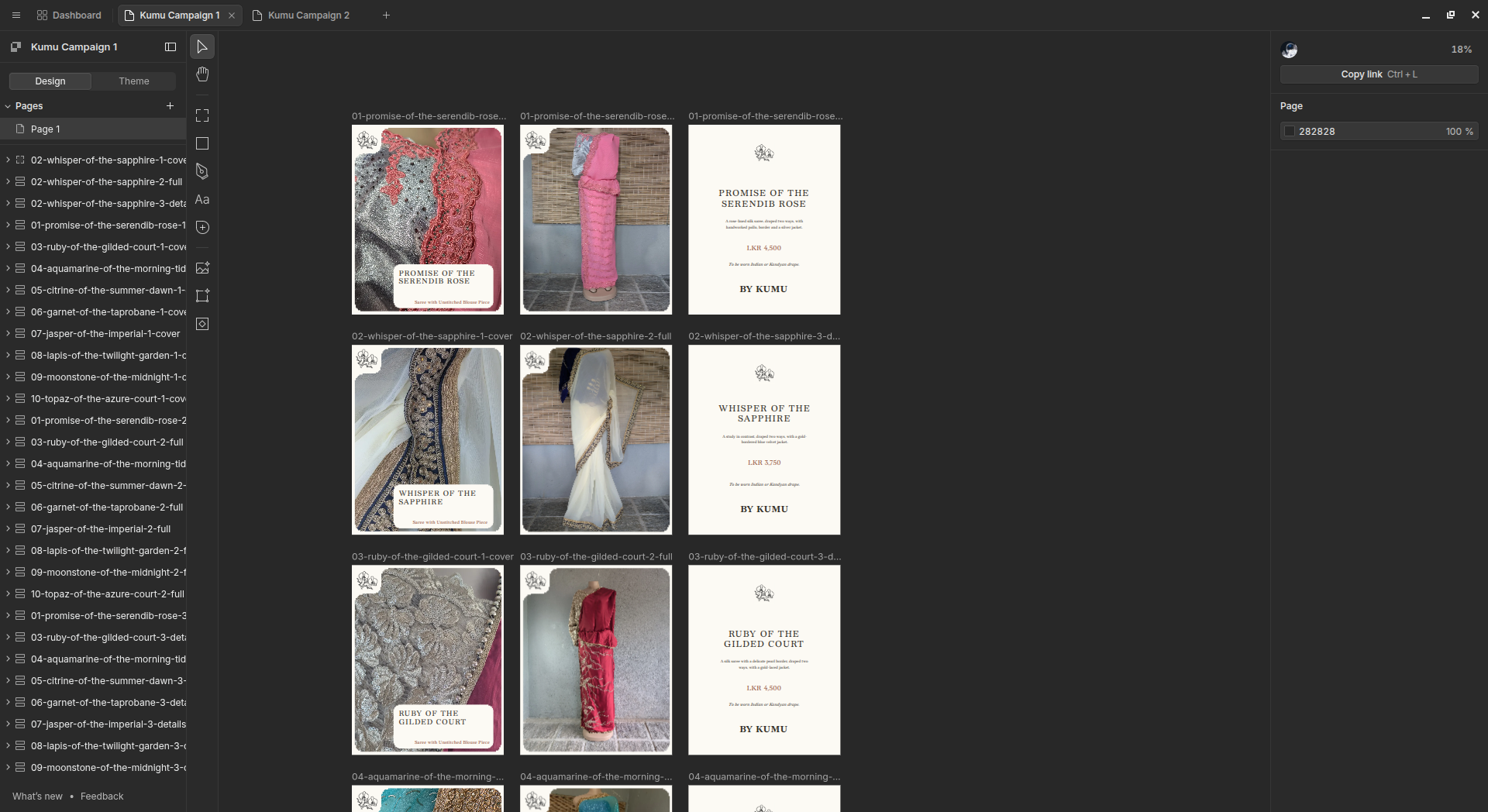
I’ll link the socials below so you can go have a look around to see how the posts turned out. Mind you they are minimalistic by design, because the whole brand has a minimalist vibe