I admit I have a problem. I get interesting ideas when I am absolutely stuffed with work, and then when I do end up having time, I either can’t find those cool ideas, or looking through a list of ideas makes me procrastinate and not pick up any of them.
Yes, this is a management task, and I am sure I could pretty easily solve it by creating some life tracker in Notion, or using some app to manage my life. But these are added steps I will probably outgrow and get tired of.
So one uneventful afternoon, I looked at what’s constant in my life. I use Obsidian day to day to do pretty random stuff like writing down notes, writing down ideas and stuff. So I thought, why not create a plugin to do my niche requirement of tracking project ideas and having a quick view of what I am supposed to focus on. I have heard of plugins, but the only plugin I’ve actually used is the Excalidraw plugin. Rather than searching for a plugin that suited my need, I thought of vibe coding one specifically for what I wanted it to do.
Problem: Well there’s three
Yeah, so I narrowed it down to three problems I wanted the plugin to solve.
The first was that I needed an easy, one stop place to park all my ideas. I had them jotted down on multiple Obsidian vaults, spanning both desktop and mobile. I wanted a single place to have my ideas. Now this doesn’t necessarily call for a custom plugin, but it pairs well with the solution to the other two problems.
The second problem is that when I have too many things ongoing, I tend to procrastinate and do none of them. This is a weakness, I admit, but hey, I am human too.
And the third is that I usually end up having to do additional work to figure out where I left off. Sometimes I come back to ideas months after I last worked on them, and I have no idea where to even look. This friction is usually demotivating and frankly frustrating.
Solving the problems
As I said before, solving the first problem isn’t a huge deal, and you don’t need a custom plugin for that. Just start using one Obsidian vault to jot down ideas, and use it consistently.
But I need these ideas to be easily transferable into active project ideas, and I want these project ideas to be visible on a dashboard, so that I can easily see what projects I have to allocate my focus to, what to do now, and then shift focus by swapping active projects.
Also, by tracking time spent on a project/task (I am gonna keep using tasks and projects interchangeably throughout the blog) I can figure out at a glance what to focus on, or not focus on, at the moment. And in order to help track time spent, it would be easy if I can assign approximate times spent using just a button press.
Swapping out active projects should also be easy, and I should be able to see what projects I can easily swap to. Also, having a one line next action will help me figure out what to do next, no matter how long it has been since I last worked on the project.
Combining all these niche requirements, I came up with this…
Chicago: An Opinionated Obsidian dashboard
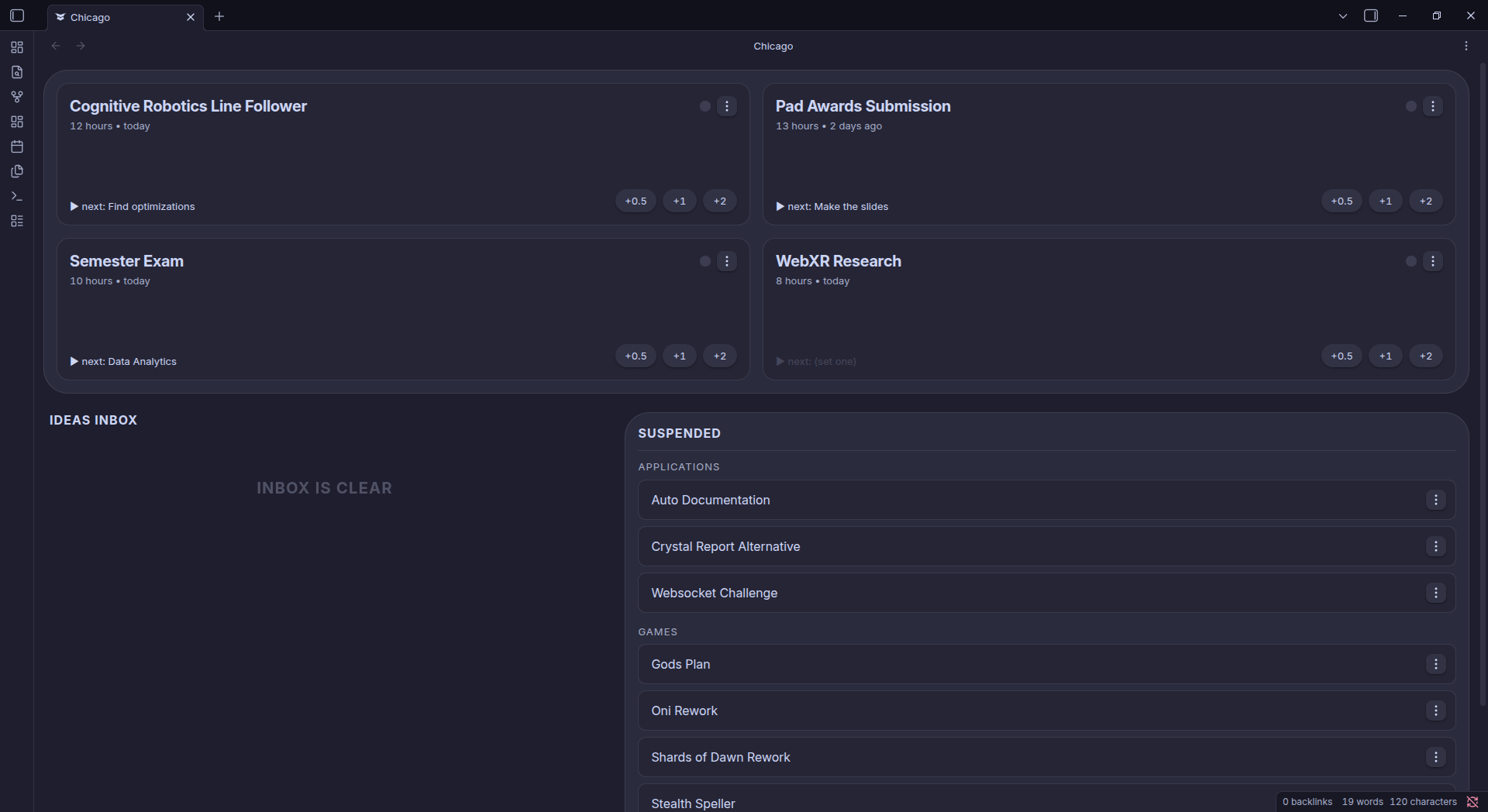
The plugin at this stage is very simple. You have 3 areas you can focus on.
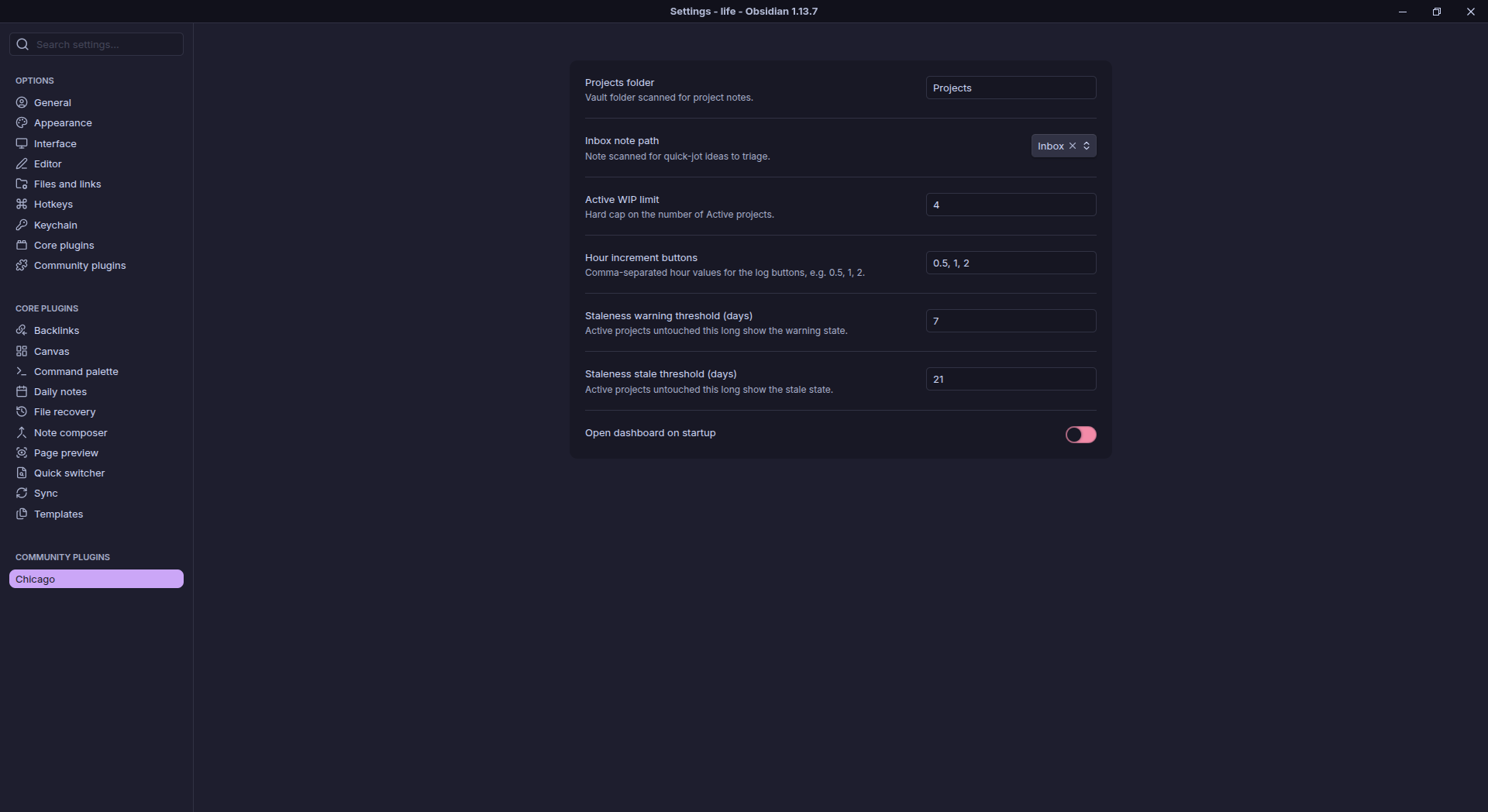
Primary focus is on the active projects at the top. You can only have a limited number of active projects (you can change this from settings, and I have it currently set to 4, which seems good). In each active project you can see how many hours you have worked on it and what the last time you worked on it was. Also on the bottom left you have the next task you should do in the project, and on the bottom right you have some buttons using which you can assign time worked on the project using one click… or a couple (you can also customise how many hours a button adds).
The next area is the Suspended Tasks area. Here is a categorized list of probable project ideas you can explore. If you want to swap out a task, you can simply suspend an active task and activate a suspended task. Suspending tasks does not clear the information you maintain during the active phase, so don’t worry, it will come back once you activate it.
The next area is the Ideas Inbox. You can simply add ideas to an inbox.md file and it shows up on the dashboard, allowing you to easily swap them from the ideas inbox to the suspended tasks list, and then if needed to the active projects list.
Also, on each active project there are small colored dots, where it turns amber after a week untouched and red after three weeks untouched, to motivate you to probably work on this. And oh, did I mention, you can simply drag and drop items between the active and suspended tabs.
Its not perfect but it works
So the most friction, I’d say, is setting up the vault. You need the vault to be structured in a particular way, where suspended and active projects live as md files in a Projects/ directory, and a separate inbox.md file maintains new ideas which I haven’t turned into projects yet.
Also, while using this I realized that a major improvement can be made in the way new ideas are added to the dashboard. Currently you have to manually open up inbox.md and then add a new bullet point with the idea. Only after that does the idea show up on the dashboard. I should, and probably will, look into an easier way of doing this, hopefully through the dashboard itself.
Otherwise the dashboard works like a charm. And it works well with themes so It blends nicely into your own obsidian vault. I don’t have any other improvements in mind at the moment, but if I do get some creative ideas on ways to improve it, you will most probably see it soon.
Oh right I forgot, you can install this as well
Yeah, I published this plugin onto the Obsidian community plugins. Why? I mean, why not? Most wouldn’t find this useful, but if you relate to my struggles, maybe you can give it an install. And if you have any ideas or improvements, just fork the repo and send a merge request. To make sure you don’t have any friction in getting the vault up and running, here is a zipped file with a sample vault structure to get started.
Check out Chicago
P.S. Chicago is a totally random name for a dashboard like this, but this one video had me listening to Chicago on repeat… So it’s the first thing that came to my mind when coming up with a name for this project.